AI Color Tools Revolutionize Smart Paint Choices
Homeowners often face frustration in the paint aisle, comparing similar swatches under artificial lights. At home, those colors shift under natural or room-specific illumination, leading to repeated trials. This common challenge highlights the need for more reliable methods in paint selection.
AI color tools address this issue by examining room photos, lighting conditions, and furnishings to suggest ideal shades. These innovations benefit homeowners, interior designers, and painters by eliminating uncertainty and reducing wasted resources. The result is a streamlined process that enhances decision-making confidence.
The Challenge of Color Selection Errors
Paint choices define a home's aesthetic but prove difficult due to variable perceptions. A neutral beige on a sample card may appear pinkish under incandescent lights or greenish in daylight. Such discrepancies complicate accurate selection.
Typical processes involve purchasing several sample cans, applying test patches, and observing them across lighting scenarios. Drying times and multiple evaluations consume hours. Costs accumulate quickly, with each sample round ranging from $25 to $50 in materials alone. For expansive areas, incorrect choices necessitate full repaints, escalating expenses to $200 through $600.
AI color tools interrupt this inefficient cycle through digital analysis, predicting real-world appearances before any application begins.
How AI Color Tools Function
Artificial intelligence processes vast data sets to generate tailored predictions. For paint selection, these tools assess environmental factors like light sources, surface textures, and color interactions. Outputs include customized recommendations from extensive brand databases.
Users engage the tools through these steps:
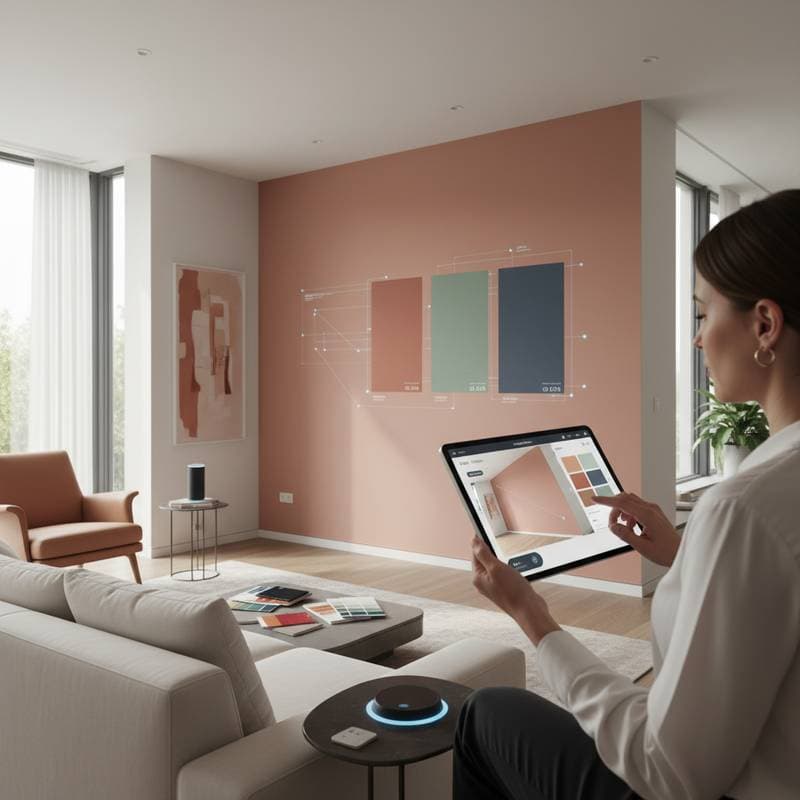
- Capture the Environment: Upload room photographs or scan via mobile camera. The system detects light angles, window positions, and dominant hues.
- Define Preferences: Specify desired tone families, such as warm earth tones or cool neutrals, and include reference images if available.
- Receive Tailored Suggestions: The algorithm evaluates thousands of shades, proposes harmonious options, and renders photorealistic simulations on walls.
- Identify Matches: Advanced features extract precise color codes from fabrics, walls, or objects, aiding coordination efforts.
This methodical approach yields previews that reflect actual conditions, fostering informed choices.
The Role of Lighting in Color Perception
Color appearance varies significantly with illumination sources and intensities. Incandescent lights amplify warm undertones, while fluorescents emphasize cools. Natural daylight reveals subtle variations that artificial settings obscure.
AI tools simulate these effects to anticipate outcomes. For example, a gray with blue undertones may intensify under cool LEDs but soften in sunlight. Warm lighting enhances yellows, potentially overwhelming smaller spaces.
By incorporating such variables, the technology ensures recommendations remain consistent across daily light changes. This precision prevents surprises and supports versatile selections.
Prominent AI Color Tools Available
A range of platforms now incorporate AI for color guidance, each with distinct strengths. Paint manufacturer applications scan uploads and suggest proprietary shades for seamless integration.
Independent services aggregate data from various brands, enabling cross-comparisons. Portable scanners pair with apps to sample physical colors instantly, ideal for matching existing elements.
Access costs vary: app subscriptions run $10 to $30 annually, while devices cost $60 to $150. These investments typically offset through avoided repaints and efficient planning.
Practical Steps for Implementing AI Tools
Maximize accuracy by preparing the space thoughtfully. Clear clutter and maximize natural light to capture authentic conditions.
Proceed as follows:
- Photograph Strategically: Take images from multiple viewpoints to document shadows and highlights comprehensively.
- Account for Time Variations: Shoot during peak and low light periods; tools refine based on diverse inputs.
- Evaluate Outputs: Prioritize three to five top recommendations and view simulations on larger displays.
- Validate Physically: Acquire small samples of leading options and apply wall tests for final confirmation.
- Prepare for Execution: Calculate paint needs—one gallon covers 350 to 400 square feet—and budget $35 to $75 per gallon for quality products.
This sequence combines digital efficiency with tangible verification.
Integrating AI with Personal Preferences
While AI provides objective analysis, individual style guides the ultimate decision. Technical perfection does not guarantee emotional appeal; a balanced neutral might lack warmth in a family space.
Treat AI as an advisory resource that refines broad options. Assess how suggested shades harmonize with furniture and flooring. Personal intuition ensures the selection aligns with lifestyle and ambiance goals.
Financial Benefits and Efficiency Gains
AI adoption proves economical across project scales. For solo efforts, tool fees plus samples total under $80, versus $200 in potential rework.
In professional settings, it shortens consultations, trimming labor by 5 to 10 percent. High-end projects benefit from client visualizations that minimize mid-process alterations.
Long-term advantages include enduring satisfaction and improved property value. The initial outlay yields substantial returns through precision and reduced errors.
Application Safety Essentials
Digital planning complements safe execution practices. Protect surfaces with drop cloths and tape during painting.
Maintain ventilation to disperse fumes, and use gloves plus eyewear for primers. For elevated or large areas, engage certified painters at $2 to $4 per square foot to ensure compliance and safety.
Compliance with Local Standards
Select paints adhering to regional VOC limits for health and environmental reasons. AI recommendations often favor low- or zero-VOC formulas suitable for interiors.
Confirm brand compatibility with codes before purchase. Widely available eco-friendly options support sustainable choices without sacrificing quality.
Enhancing Digital Outputs with Sensory Input
AI excels in simulation but benefits from human oversight. Narrow choices digitally, then observe physical samples in situ.
Adapt intensities for room functions—a serene bedroom may suit muted tones, while a kitchen demands vibrant accents. Evaluate palette interactions with decor elements.
This hybrid method preserves the intuitive essence of design amid technological advances.
Launch Your Next Paint Project
Begin exploring with accessible AI applications to envision transformations. Pair virtual trials with sample validations for optimal outcomes. This approach secures colors that endure and delight.